Documentation
How CarmenWise works, answers to common questions, and how we handle your data.
Getting started
CarmenWise is organized into seven modules, each its own house tile on your homepage.
Frequently asked questions
Tap a question to expand it.
Who is CarmenWise for?
CarmenWise is built for households and families who want one shared place for finances, calendar, groceries, meals, health records, home maintenance, and important documents.
Can I add other people in my household?
Yes. From Settings you can invite adults who sign in with their own account, or add "managed" members (like young kids) who don’t log in themselves but can still be assigned events, meals, and chores.
If I connect my bank account, can CarmenWise move my money?
No. Bank connections use Plaid in read-only mode. CarmenWise can see balances and transactions to build your financial picture, but it has no ability to move, withdraw, or transfer money, and never will.
If I connect Gmail, does CarmenWise read all my email or send anything on my behalf?
No. The Gmail connection is read-only and only used to scan for calendar-worthy content (appointments, invitations, school events) and surface it as a suggestion. Nothing is ever added to your calendar, sent, or deleted without you explicitly reviewing and accepting it.
What happens to my data if I disconnect my bank or Gmail?
The connection and its access token are removed immediately. Historical data already imported (like past transactions) stays, the same way it would in any finance app, unless you delete it yourself.
Does CarmenWise use AI, and does that mean my data trains an AI model?
A few features (like document parsing and Carmen) send the specific data needed for that feature to Anthropic’s Claude API to generate a response. That data is used only to produce your result — Anthropic’s API does not use it to train models by default.
What is Carmen, and does it see my household’s data?
Carmen is CarmenWise’s in-app assistant — it can look things up in your own household’s data (your calendar, grocery lists, meal plans, subscriptions, a net-worth total, and outstanding Health/Maintenance/Vault items) to answer your questions, using CarmenWise’s own Claude API key, not yours. It can suggest adding something — a calendar event, a grocery item — but every suggestion shows you a confirmation card first. Carmen can never create, edit, or delete anything on its own. If you use the microphone button, your recording is sent to Groq (a speech-to-text provider) to be transcribed; CarmenWise doesn’t store the audio, and the text lands in the message box for you to review before sending.
Can other CarmenWise users see my household’s data?
No. Every piece of data is scoped to your household. Only people you’ve explicitly added as members can see it.
How do I delete my data?
Reach out to whoever set up your household’s CarmenWise account and ask them to remove it, or delete individual records yourself at any time from within each module.
Privacy & data
The short version: it’s your family’s data, not a product to be sold.
CarmenWise relies on a small set of service providers to run — for hosting, authentication, database storage, and the specific integrations you choose to connect (like Plaid or Gmail). Those providers process data on our behalf to make the app work; none of them are advertisers, and none of this data is sold.
Privacy Policy
Effective date: September 29, 2026
1. Information we collect
Account information: your name and email address, collected by our authentication provider (Clerk) when you sign up or sign in.
Household data you provide directly: financial figures and accounts you enter manually, calendar events, grocery lists, meal plans, health records, home-maintenance records, and any documents you upload to the Vault.
Conversations with Carmen (the in-app assistant) and the CFO Agent, including your messages and their replies, are stored so each assistant has a working conversation history.
Phone number, if you choose to enable text message reminders — collected only after you check a consent box and verify the number with a one-time SMS code, and used solely to send the reminders described in Section 5.
Connected-service data, only for the integrations you choose to turn on: read-only bank account balances and transaction history via Plaid, and read-only Gmail message content via Google OAuth (scanned only for calendar-relevant content — see Section 4).
Usage data such as sign-in timestamps and basic device/browser information, collected automatically to keep the service secure, reliable, and to diagnose problems.
2. How we use your information
To provide the core service: storing and displaying your household’s data back to you and the household members you’ve added.
To power specific features you use — for example, sending Plaid account data to build your net-worth and cash-flow views, or sending transaction categories to Anthropic’s Claude API to generate the Economic Overlay.
To send account-related and household-requested communications, such as the daily agenda email, reminder emails, or a support reply.
To maintain and improve the security and reliability of the service, including detecting and preventing fraud or abuse.
We do not use your data for advertising, and we do not build advertising profiles.
3. Third-party service providers
CarmenWise is built on a small number of service providers who process data on our behalf to make the app work. None of them are advertisers, and we do not permit them to use your data for their own purposes.
Clerk — authentication and account management.
Supabase — database and encrypted file storage.
Vercel — application hosting.
Plaid — read-only bank account connections, only if you choose to connect one.
Google (Gmail API) — read-only email scanning for calendar-relevant content, only if you choose to connect it.
Anthropic (Claude API) — powers specific AI features (see Section 6); only the data needed for that feature is sent, and it is not used to train Anthropic’s models by default.
Groq — transcribes voice input to text when you use the microphone button in Carmen (see Section 6); only the audio clip you record is sent, and CarmenWise does not store the recording.
Twilio — delivery of SMS text message reminders (see Section 5), only if you choose to enable them.
Resend — delivery of transactional emails (reminders, the daily agenda digest).
4. Connected accounts: Plaid and Gmail
Bank connections use Plaid in read-only mode. CarmenWise can see balances and transaction history to build your financial picture, but has no ability to move, withdraw, or transfer funds, and never will.
A Gmail connection is read-only and used only to scan for calendar-worthy content (appointments, invitations, school events) and surface it as a suggestion for you to review. CarmenWise never sends email, deletes email, or modifies your mailbox, and nothing is added to your calendar without you explicitly accepting the suggestion.
Disconnecting either integration immediately revokes and deletes the stored access token. Historical data already imported (like past transactions) is retained the same way it would be in any finance app, unless you delete it yourself.
5. SMS text message communications
If you check the consent box and verify your phone number with a one-time SMS code, CarmenWise may send you text message reminders — calendar events, chores, and activities that you or another household member scheduled — through our messaging provider, Twilio.
Message frequency varies based on your household’s calendar activity; there is no fixed schedule. Message and data rates may apply.
No mobile information will be shared with third parties or affiliates for marketing or promotional purposes. Your mobile number is used solely to deliver the reminders described here, through our messaging provider Twilio, which sends the message on our behalf and does not use your number for its own purposes.
You can stop text reminders at any time by replying STOP to any message, or by removing your phone number from Notifications settings in the app. Reply HELP for assistance.
6. AI features
CarmenWise uses Anthropic’s Claude API in a few distinct ways, each sending only the specific data that feature needs.
Carmen, the in-app assistant, can look things up in your own household’s data to answer your questions — your calendar/agenda, grocery lists, meal plans, subscriptions due soon, a net-worth total, and outstanding items in Health, Maintenance, and Vault (not document contents or line-item account balances). Carmen runs on CarmenWise’s own Claude API key, not yours. It can propose adding a calendar event, grocery item, subscription, note, or meal, but it cannot create, edit, or delete anything itself — every proposal shows you a confirmation card and requires your explicit action before anything is added.
If you use Carmen’s microphone button, the short audio clip you record is sent to Groq (a speech-to-text provider — not Anthropic) to be transcribed. CarmenWise does not store the recording. The resulting text appears in Carmen’s message box for you to review and edit; it is never sent automatically.
The CFO Agent is a separate, opt-in assistant for deeper financial analysis. It requires you to connect your own Anthropic API key; conversations you have with it are sent using your key, not a shared CarmenWise key.
The Economic Overlay and document/receipt parsing are narrower, single-purpose features — for example, sending your transaction categories to generate the Economic Overlay, or a scanned document/receipt to extract its text.
Your conversations with Carmen and the CFO Agent are stored (see Section 1) so each can maintain a working history; they are not used to train Anthropic’s models by default.
AI-generated output is informational and is never applied to your data automatically — every AI suggestion (a calendar event, a parsed document, an insight) requires your explicit review and action before anything changes.
7. Data storage and security
Data is stored in a Postgres database (via Supabase) and scoped to your household — every record is filtered by household membership, so only people you’ve added as members can see it.
Uploaded files (Vault documents, health records, vaccination cards) are encrypted at rest (AES-256) before being written to storage, with a separate encryption key per integration so a problem with one connection can’t expose another.
Access tokens for connected services (Plaid, Gmail) are encrypted at rest and only decrypted in memory at the moment they’re needed to make a request to that service.
No method of transmission or storage is 100% secure, and we cannot guarantee absolute security, but we apply industry-standard practices throughout.
8. Data retention
We retain your household’s data for as long as your household exists on CarmenWise, so the service can continue to function.
You can delete individual records (a transaction, a document, a calendar event) yourself at any time from within each module.
If you’d like your entire household’s account and data deleted, contact us using the details in Section 12 and we will remove it, except where we’re required to retain certain records by law.
9. Managed (non-login) household members
CarmenWise supports adding "managed" members — typically children — who don’t have their own login credentials but can be assigned events, meals, chores, and health records within the household.
Data about a managed member is controlled by the adult household members who manage the account, in the same way a parent would keep a paper calendar or medical file for a child. CarmenWise does not knowingly collect personal information directly from children; all managed-member data is entered by an adult member of the household.
10. Your rights and choices
You can access, edit, or delete most of your household’s data directly within the app at any time.
You can disconnect Plaid or Gmail at any time from the relevant settings screen, which immediately revokes and deletes the stored access token.
You can request a copy of your data, or request deletion of your account and all associated data, by contacting us (Section 12).
Depending on where you live, you may have additional rights under applicable privacy law (such as the right to object to certain processing, or to lodge a complaint with a supervisory authority) — contact us and we’ll help.
11. Changes to this policy
We may update this Privacy Policy from time to time to reflect changes to the service or applicable law. If we make a material change, we’ll take reasonable steps to notify active households, such as an in-app notice or an email. The "Effective date" below reflects the last update.
12. Contact us
Questions about this Privacy Policy or your data can be sent to privacy@carmenwise.com.
SMS opt-in example
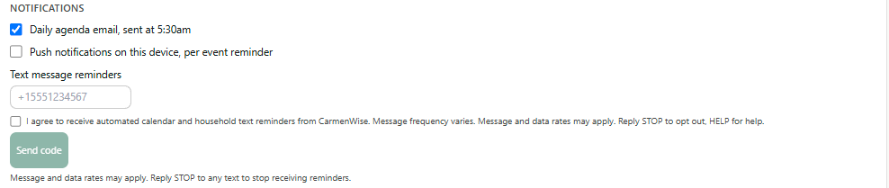
Text message reminders are opt-in from within the CarmenWise app’s Notifications settings (Household & Notifications → Notifications). A household member enters their phone number, must check an unchecked-by-default consent box before the send button is enabled, and verifies the number with a one-time SMS code before any reminders are sent — as shown below.
Terms & Conditions
Effective date: September 29, 2026
1. Acceptance of these terms
By creating a CarmenWise account or using the service, you agree to these Terms & Conditions and to our Privacy Policy. If you’re creating a household on behalf of other members (like a spouse or children), you’re responsible for having their permission to add their information.
2. Description of the service
CarmenWise is a household management platform covering finances, a shared calendar, groceries, meal planning, health records, home maintenance, and secure document storage, with optional connections to third-party financial (Plaid) and email (Gmail) services and optional AI-powered features.
3. Accounts and eligibility
You must be at least 18 years old to create a CarmenWise account. Children and other dependents can be added as "managed" members by an adult account holder, but do not hold accounts of their own.
You’re responsible for maintaining the confidentiality of your login credentials and for all activity that occurs under your account.
4. Household membership and shared data
CarmenWise uses a shared-household trust model: once someone joins your household (via an invite code), they can generally view and edit the household’s shared data across modules — finances, calendar, groceries, meals, health, maintenance, and vault documents — the same way any member of a household already has access to the mail, the fridge, or the family calendar on the wall.
Only invite people you trust with that level of access. Any household member can remove another member (except themselves, which uses a separate "leave household" action) — use this responsibly.
5. Acceptable use
You agree not to use CarmenWise to store or transmit unlawful content, attempt to gain unauthorized access to another household’s data, interfere with the service’s operation, or reverse-engineer the application beyond what’s permitted by law.
You’re responsible for the accuracy of the data you enter — CarmenWise displays and computes based on what you provide, and can’t verify its accuracy independently (except where it’s pulled directly from a connected account, like Plaid).
6. Financial features and third-party connections
CarmenWise is not a bank, broker-dealer, or registered investment advisor, and nothing in the app constitutes financial, tax, legal, or investment advice.
The Plaid bank connection is strictly read-only — CarmenWise cannot move, withdraw, or transfer money on your behalf, and never will.
Financial projections, scores, and insights shown in the app (including AI-generated ones) are estimates for informational purposes only and should not be the sole basis for a financial decision. Consult a licensed professional for advice specific to your situation.
7. SMS messaging program
By checking the consent box and completing SMS verification in the app, you consent to receive text message reminders (calendar events, chores, activities, and related household notifications) from CarmenWise via our messaging provider, Twilio.
Message frequency varies based on your household’s calendar activity. Message and data rates may apply. This program is available for US phone numbers only, and carriers are not liable for delayed or undelivered messages.
You can opt out at any time by replying STOP to any message, or by removing your phone number from Notifications settings in the app. Reply HELP for assistance.
See our Privacy Policy, Section 5, for how we handle your mobile number.
8. AI-generated content
Certain features generate content using Anthropic’s Claude API (see our Privacy Policy, Section 6). AI-generated output can be inaccurate or incomplete. It is provided for informational purposes only, and CarmenWise is not liable for decisions made based on it. AI suggestions never modify your data automatically — you always review and confirm before anything is applied.
9. Intellectual property
The CarmenWise application, its design, and underlying software are owned by CarmenWise and protected by applicable intellectual property laws. You retain ownership of the data you enter into the app; we don’t claim ownership of your household’s content.
10. Termination
You may stop using CarmenWise and request account deletion at any time (see our Privacy Policy, Section 12). We may suspend or terminate access to accounts that violate these terms, engage in abusive behavior, or pose a security risk to the service or other users.
11. Disclaimers and limitation of liability
CarmenWise is provided "as is" and "as available," without warranties of any kind, express or implied, including fitness for a particular purpose or non-infringement. We do not guarantee the service will be uninterrupted, error-free, or fully secure.
To the fullest extent permitted by law, CarmenWise and its operators are not liable for any indirect, incidental, or consequential damages arising from your use of the service, including reliance on financial estimates, AI-generated content, or data loss, except where such liability cannot be excluded by law.
12. Changes to these terms
We may update these Terms & Conditions from time to time. If we make a material change, we’ll take reasonable steps to notify active households. Continued use of CarmenWise after a change takes effect constitutes acceptance of the updated terms.
13. Governing law
These terms are governed by the laws of the jurisdiction in which CarmenWise operates, without regard to conflict-of-law principles, except where local consumer-protection law provides otherwise.
14. Contact us
Questions about these Terms & Conditions can be sent to legal@carmenwise.com.